 >
>
Unlocking the Hidden Value of Microsoft 365: Features You’re Already Paying For but Rarely Use
Unlocking Microsoft 365
Note
This article assumes you are using a Microsoft 365 Business Premium, E3, or E5 licence, as some of the tools and features mentioned require this level of subscription.
As a trusted IT Support and Cyber Security partner, we always recommend one of these licences. The enhanced security and management features they provide make the additional investment well worth it.
Introduction
Microsoft 365 has become the default productivity suite for SMEs across Ireland. Most businesses rely on the obvious tools such as Outlook for email, Word for documents, Excel for spreadsheets, and Teams for communication. What many do not realise is that they are already paying for dozens of powerful features hidden inside their Microsoft 365 subscription.
These lesser-known apps can streamline collaboration, improve security, enhance compliance, and reduce costs by removing the need for extra software. Yet, in our experience as a trusted IT services partner in Dublin, most SMEs use only a fraction of what is available to them.
In this article, we highlight the most valuable but underused Microsoft 365 features and show how your business can start taking advantage of them today.
Accessing Microsoft 365 Apps
Let’s start with the basics; how you access your Microsoft 365 applications.
From within the Outlook web client, click the App Launcher (the grid icon in the top left corner). This opens the menu of Microsoft 365 tools available to your subscription, ready for you to explore.
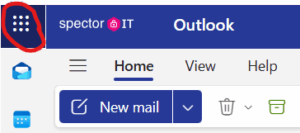
My less than artful red line shows the Application launcher. Simply click on this and the apps that you have subscribed to will be available to you.

-
Microsoft Planner: Simple Project Management Without Extra Cost
When SMEs need a lightweight project management tool, they often pay for platforms like Trello or Asana. However, Microsoft Planner is already included in most Microsoft 365 subscriptions.
Planner allows your team to:
-
Create boards with tasks, deadlines, and checklists
-
Assign tasks to individuals or teams
-
Integrate seamlessly with Microsoft Teams for collaboration
-
View progress in visual charts or Kanban-style boards
For businesses managing client work, internal projects, or compliance tasks, Planner is often all that’s required. It also connects directly with Microsoft Teams, creating a central workspace for communication and task tracking.
For a quick introduction, you can watch this video overview of Planner.
-
-
Microsoft Forms: Fast Surveys and Data Collection
Need staff feedback, client satisfaction surveys, or quick polls? Many SMEs pay for SurveyMonkey or Google Forms, yet Microsoft Forms is already part of your Microsoft 365 suite.
It enables you to:
-
Build branded surveys, quizzes, and polls
-
Generate automated charts and summaries
-
Link results directly to Excel for deeper analysis
You can run an IT satisfaction survey for employees or gather client feedback right from your Microsoft 365 dashboard. It’s quick, secure, and built into your plan.
Watch a short Microsoft Forms tutorial to see how easy it is to get started.
-
-
OneNote: The Forgotten Powerhouse
Despite being one of the most versatile Microsoft 365 apps, OneNote is often underused. Think of it as a digital notebook for your entire organisation.
Benefits include:
-
Structured notebooks for projects, clients, or departments
-
Real-time collaboration with shared access
-
Integration with Outlook and Teams
-
Support for handwriting and drawings on tablets
For SMEs that want to improve documentation and knowledge sharing, OneNote is a powerful tool already included in your Microsoft 365 licence. Pairing OneNote with your Managed IT Services ensures notes and documentation are securely backed up and accessible across your business.
-
-
SharePoint: More Than Just a File Server
Most businesses know SharePoint as the engine behind OneDrive, but it’s capable of far more. SharePoint can act as a central hub for company knowledge, policies, and communication.
You can use it to:
-
Create an internal intranet with company news and resources
-
Manage document libraries with version control and permissions
-
Enforce compliance through audit trails, retention policies, and sensitivity labels
Instead of relying on messy shared folders, SharePoint provides a secure, professional platform for collaboration and governance.
-
-
Microsoft To Do: Personal Productivity Made Easy
Many staff still rely on sticky notes or external task apps, but Microsoft To Do is built into your Microsoft 365 account and integrates seamlessly with Outlook and Teams.
Key features include:
-
Personalised to-do lists with reminders
-
Sync across all devices
-
Integration with flagged Outlook emails
-
Shared lists for group tasks
Encouraging staff to adopt To Do can reduce missed deadlines and boost productivity across your organisation. As part of our user education and training, we help businesses streamline daily workflows using these built-in tools.
-
-
Advanced Security and Compliance Features
This is where Microsoft 365 truly pays for itself, yet many SMEs never activate the advanced security features included in their licence.
Some of the most valuable tools include:
-
Multi-Factor Authentication (MFA): One of the strongest defences against unauthorised access.
-
Data Loss Prevention (DLP): Stops sensitive data from leaving your organisation.
-
Email Encryption: Protects confidential communications.
-
Microsoft Defender for Office 365: Blocks phishing and malware.
-
Intune: Manages devices and enforces conditional access policies to secure endpoints.
Too often, SMEs purchase additional security tools when these enterprise-grade protections are already available. Configuring them correctly with expert help from our Cybersecurity Services significantly reduces your risk profile and ensures compliance with GDPR and NIS 2 standards.
-
-
Whiteboard: Brainstorming Without Boundaries
Remote and hybrid teams often miss the experience of a shared physical whiteboard. Microsoft Whiteboard fills that gap perfectly.
Its features include:
-
Real-time collaborative drawing and note-taking
-
Integration with Teams meetings
-
An infinite digital canvas for brainstorming and workshops
Instead of paying for Miro or Lucidchart, your team can use Whiteboard at no extra cost. Combined with Microsoft Teams, it helps create an engaging and collaborative virtual workspace.
-
-
Copilot: AI Assistance Built Into Microsoft 365
Microsoft Copilot is not free, but for an additional €20 per user per month it introduces powerful AI assistance across Word, Excel, PowerPoint, and Outlook.
Copilot can:
-
Draft emails, documents, and presentations
-
Analyse data sets in Excel
-
Summarise Teams meetings and notes
-
Suggest next actions and insights
To use Copilot effectively, proper preparation is required, including governance settings and access permissions.
-
Why Are These Features Overlooked?
-
Lack of awareness: Microsoft 365 evolves constantly, and many SMEs are unaware of what’s included.
-
Training gaps: Staff often only receive training for Outlook and Teams.
-
Change resistance: Employees prefer familiar tools, even when better alternatives exist.
-
Perceived complexity: Some features, like SharePoint or Copilot, sound technical but are far easier to use with the right setup and guidance.
How Spector Helps SMEs Unlock Microsoft 365’s Full Value
At Spector IT, we frequently meet clients who pay for multiple software tools while barely scratching the surface of Microsoft 365. Our role is to help you:
-
Audit your current setup to identify unused features
-
Configure and secure tools like MFA, DLP, and Defender
-
Train your staff to use the platform with confidence
-
Consolidate software spending and reduce unnecessary costs
By fully leveraging what you already pay for, your business can save money, increase productivity, and strengthen security. We combine IT Support with strategic guidance so your Microsoft environment delivers maximum value.
Explore your potential
Microsoft 365 is far more than just Word, Excel, and Outlook. Hidden within your subscription are powerful tools that can replace costly third-party software, improve collaboration, and protect your business.
If you are ready to unlock the full potential of Microsoft 365, book a consultation with Spector today. We will help you make the most of what you already own and ensure your technology is working as hard as you are.