 >
>
What Does Good IT Support Actually Look Like?
What Does Good IT Support Actually Look Like?
Most businesses don’t know what good IT support looks like. Not because they’re not smart enough to figure it out, but because nobody has ever explained it properly.
Here’s what typically happens. You sign up with an IT provider. Someone breaks something. You call or email. Someone fixes it. Repeat. That’s what most people think IT support is. And to be fair, for a long time, that’s what most IT providers delivered.
But that model has a problem. It’s entirely reactive. You only get value when something goes wrong. And by the time something goes wrong, it’s already costing you time, productivity and patience.
So what does good actually look like? In our experience, it comes down to three things working together: reactive support, proactive management, and strategic account management. All bound together with mature repeatable processes. Most businesses get the first one. Very few get all three.
Reactive IT support: the bit everyone knows
This is the helpdesk. Someone can’t print. A laptop won’t connect to Wi-Fi. Email has stopped syncing. You pick up the phone or fire off an email, and someone fixes it.
This part matters. It needs to be fast, traceable, and handled by someone who actually understands the problem. But here’s the thing most providers won’t tell you: if reactive support is the only thing you’re getting, your IT partner is essentially a fire brigade. They show up after the damage starts. That’s not a partnership. That’s a rescue service.
Good reactive support means a real person answers the phone. Not a call queue. Not a chatbot. A person who can either fix the issue or get it to someone who can, fast. It means every issue gets a ticket number so nothing falls through the cracks. And it means there’s a clear escalation path when something serious happens, not just “we’ll get back to you.”
Proactive IT management: the bit most businesses don’t get
This is where the gap usually is. Proactive IT management means your provider is watching your systems before something breaks. Patching devices weekly. Monitoring server health around the clock. Catching an alert at 7am and fixing the issue before your team even logs in.
It means your devices are encrypted, your software is up to date, and your security tools are actually doing what they’re supposed to do. Not just installed. Configured, monitored, and managed.
Most businesses don’t realise they’re missing this because it’s invisible when it works. You don’t notice the problem that never happened. But the difference between a provider who patches your systems weekly and one who doesn’t? That difference shows up the day a critical vulnerability gets exploited. And by then, it’s not a support ticket. It’s a crisis.
We run over 2,400 automated alerts across our client base. That’s not a number we throw around to sound impressive. It’s the reality of what it takes to stay ahead of issues across devices, servers, and cloud environments. Most of those alerts get resolved before the client knows there was a problem. That’s what proactive looks like in practice.
Account management: the bit that creates real value
This is the layer that separates a good IT provider from a great one, and it’s the one most providers skip entirely.
Account management means someone in your IT provider’s team knows your business. Not just your network topology. Your business. Your goals, your risks, your budget, and where technology fits into all of it.
It means regular strategic reviews where you sit down together and look at a scorecard that scores your technology across areas like endpoint protection, backup and recovery, identity management, and Microsoft 365 configuration. Not gut feel. Actual scores, based on defined best practice, that show you exactly where you’re strong and where the gaps are.
Sample Scorecard
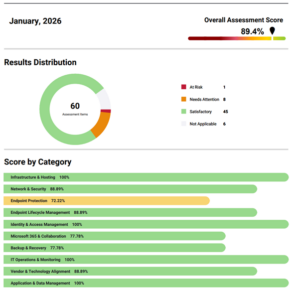
That scorecard drives everything. The gaps become your roadmap. The roadmap gets broken into quarterly initiatives with clear costs. Nothing is a surprise. You know what needs doing, why it matters, and what it costs before a single change is made.
This is where IT stops being a cost centre and starts being a business enabler. It’s where you move from “fix what’s broken” to “plan what’s next.” And it’s where the real trust gets built, because your provider isn’t just keeping the lights on. They’re helping you make better decisions about technology.
If your IT provider has never sat down with you and asked “what does good look like for your business?” then you’re not getting account management. You’re getting maintenance.
What should you expect form you IT Support Provider?
If you’re evaluating your current provider or looking at a new one, here’s a simple way to think about it.
Reactive support keeps you running day to day. Proactive management stops problems before they start. Account management aligns your technology with where your business is going. You need all three. Not as a nice to have. As a baseline.
Ask your provider: How do you monitor our systems outside of business hours? When was the last time you reviewed our technology roadmap? What’s our current risk posture, and what are you doing about the gaps?
If those questions get blank stares, you’ve got your answer.
What’s next?
Over the coming weeks, we’ll be digging into each of these areas in more detail. SLAs and what they actually mean. Shared responsibility and why the best IT relationships have obligations on both sides. What proactive monitoring looks like in practice. And how the strategic layer, scorecards, roadmaps and regular reviews, is where the real value lives.
If any of this has you looking at your current setup and wondering whether you’re getting what you should be, that’s a conversation worth having. No sales pitch. Just a straight answer on where you stand and what better could look like.
| Want to see what a full Strategic Business Review looks like?
We’ve put together a sample report showing the scorecard, roadmap and investment plan that every one of our clients receives. Download it here and see for yourself what strategic IT management looks like in practice. [Download Here: Sample Strategic Business Review] |